KuantAI
Ask from the tool you already think in.
Connect KuantAI to your AI client and reach your own trading state in plain language. It can read, research and propose. It cannot place an order, and that is not a setting.
Actually running
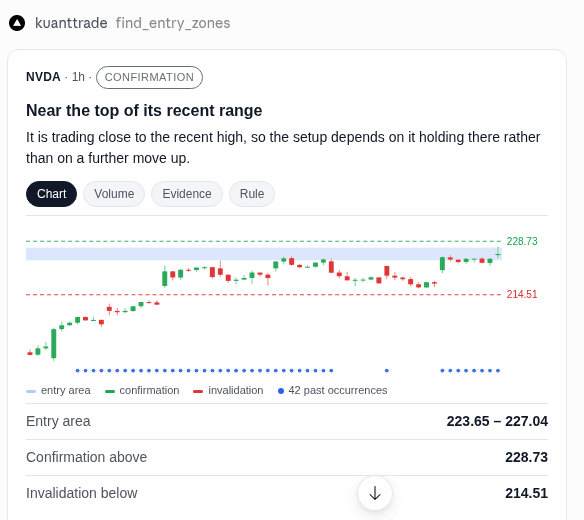
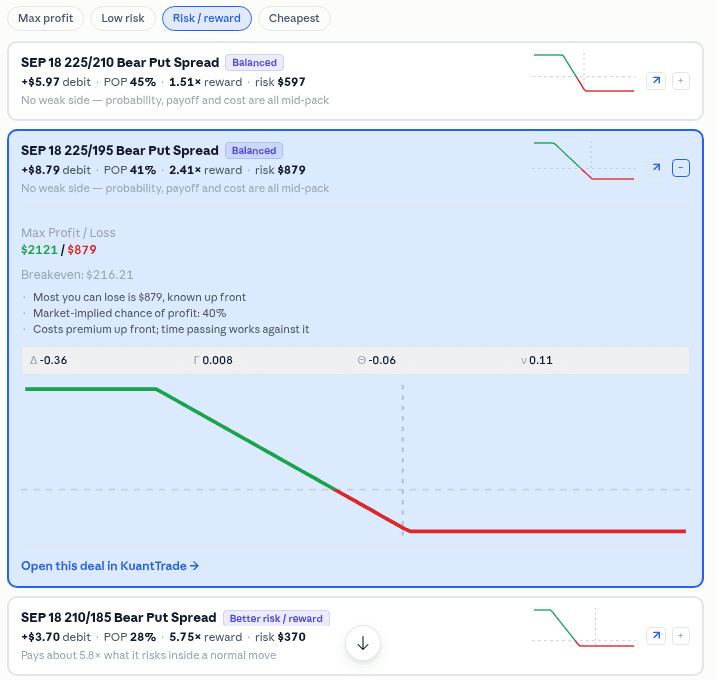
This is it, inside Claude.
Not a mockup of a conversation. The card is drawn by the connector in the client itself, from your own account.
Showing the work
The card carries its evidence, and the terms it was measured on
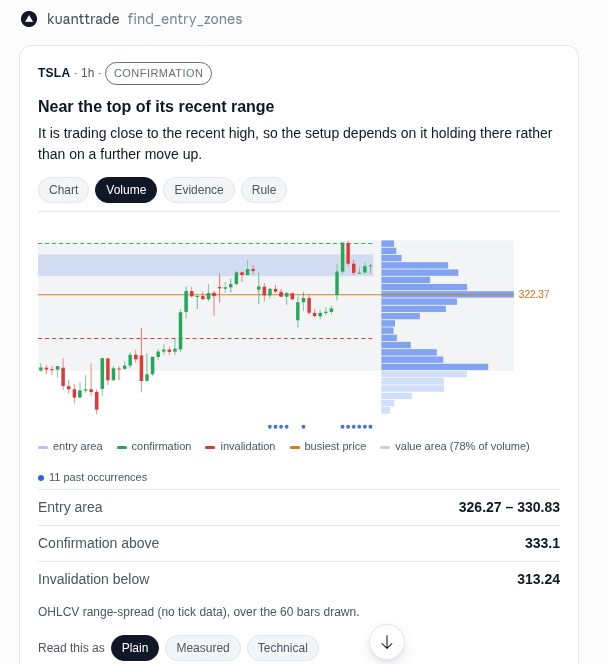
Ask where a symbol has actually been accepted and the answer is a distribution rather than a level: the busiest price, the band that holds most of the trading, and where the current price sits against it.
- The share is what the band held, not what it aimed at
- A value area grows a whole shelf at a time, so it overshoots the share it was grown toward. The card prints what it actually captured. Printing the target instead would state an intention as a measurement.
- The method is on the card
- This profile is attributed from open, high, low, close and volume rather than from tick data, over the bars in the frame. It is an approximation, and it says so where the numbers are.
- Plain, measured and technical are one fact in three notations
- Not a beginner mode. Nobody is shown a simpler sentence that quietly disagrees with the fuller one, and where a rule is attached the technical line is derived from that rule, so the notation most likely to be acted on cannot drift from what would actually run.
Where it runs
It comes to your tool, not the other way round.
Connect from the AI client you already work in. Your positions, your strategies and your bounds, reachable in plain language.
- Claude
Web and desktop. Option deal cards and entry zones render inside the conversation.
- Claude Code
The full flow from the terminal, including proposals and approvals.
- ChatGPT
Settings → Connectors, in developer mode. Deal cards and entry zones render in the chat.
- Cursor
Connect the server and work alongside your code.
- VS Code
Same connection, inside the editor you already have open.
Antigravity and JetBrains are next. Both speak MCP, so the work is a connection guide rather than a new surface.
What it can reach
27 tools, and only three of them write anything.
These are the real identifiers your agent will call. Everything except the propose group reads; the propose group writes a proposal and an approval id.
Your state
6Positions, marks, sellable balance and the strategies you are running.
- get_open_positions
- get_position
- get_mark_price
- get_sellable_balance
- list_strategies
- get_strategy
The market
4Where a setup sits today, whether anything like it has happened before, and the catalog of named patterns with their past occurrences.
- find_entry_zones
- find_similar_patterns
- list_patterns
- get_pattern_evidence
Options
3Gamma levels and volatility context for one underlying, and a pre-trade check of an options idea against them. The check informs; it never blocks an order.
- get_gamma_levels
- get_vol_profile
- check_trade
Backtests
2Your own backtest runs and their stored results. A backtest replays past data; it is not a forecast.
- list_backtest_runs
- get_backtest_result
Your bounds
4The autonomy level, the kill switch, and the vocabulary it is allowed to use.
- get_autonomy_level
- get_killswitch
- describe_strategy_vocabulary
- compile_intent
The record
2Past runs and anything still waiting on you.
- list_recent_runs
- list_open_approvals
Proposals
5The only tools that write. Each records a proposal and hands back an approval id. None of them places an order.
- propose_order
- propose_validated_order
- propose_options_deal
- propose_strategy
- promote_intent
Waiting
1Keeps the conversation open while you decide somewhere else.
- await_approval
A run
It reads before it reasons.
Every run records what it looked at, in order, so a proposal can be traced back to the state it was made from.
There is no reasoning transcript here because none is recorded. What the run stores is which tools were called and what they returned, which is the part you can actually check.
How much rope
Four settings, and you pick the ceiling
The level decides whether something can act at all, propose and wait, or act inside bounds you set. It is a ceiling, not a target.
- L0
Observe
Reads your state and answers questions. Cannot propose anything.
- L1
Suggest
Can put a suggestion in front of you. Nothing is recorded as pending.
- L2Default
Propose and wait
Writes a proposal and an approval id. You confirm it in the app, and nothing reaches your broker until you do.
- L3
Bounded
Can act without a per-order confirmation, only inside the limits you set, and only where you enabled it.
The level in force is the lowest of every setting that applies, so a permissive strategy cannot raise a cautious account. There is no fifth rung and none is planned here: a ladder drawn with a greyed-out top step reads as a promise, and this one has no top step to grey out.
The limits
It proposes. Your bounds refuse. You approve.
Both halves are the same design. A proposal arrives with its checks attached, and an order that breaks a bound is refused rather than quietly resized to fit.
- per-trade limit$2,152 / $5,000
- concentration11.4% / 35%
- buying power$18,240
- kill switchoff
Illustrative data. The instrument, prices, strikes, expiry and figures shown are examples chosen to show how the product works. They are not live market data, not a trade, not an opinion about any instrument, and not a recommendation.
The order was rejected, not reduced. Quietly trimming it to the ceiling would look helpful and hide the fact that you asked for something this account cannot support.
Questions people actually ask.
What is this, in one sentence?
A connection between your AI client and your own trading account, so you can ask about positions, research a setup or get a structure proposed without leaving the tool you are already in.
Can the AI place a trade without me?
No, and not because of a setting you could change by accident. Confirming an order is a permission no machine identity is allowed to hold. When the platform's own owner requested that permission for a key, the request was refused.
Who holds my broker credentials?
You do. Orders are placed through your own brokerage account under credentials you control and can revoke at any time. KuantTrade never holds your funds or securities.
Can I try it without real money?
Yes. Paper accounts behave exactly like live ones, including approvals, so you can run the whole flow for weeks before anything touches real capital.
Does asking cost me anything?
Reading your state and checking bounds does not call a model. Interpreting a sentence into a proposal does, which is why there is also a direct path for when you already know the symbol, side and quantity.
Connect it and ask it something.
Start on a paper account. Nothing reaches a market until you approve it.